


Scooter's Coffee
4.32.14K Reviews
App Specs
- Version
- 6.1.17
- Updated On
- License
- Free
- Downloads
- 1,000,000+
- Developer
- Scooter's Coffee
- Categories
- Food & Drink
- Platform
- Android, iOS
Screenshots
 Analysis by AppCompare
I reach for a coffee app when I want to make a quick stop feel more predictable, not when I want another complicated routine. Scooter's Coffee is built around ordering, paying, and collecting rewards at Scooter’s, so its usefulness depends on how often that chain fits into your day. I found the best reason to use it is straightforward: it can help turn a familiar order into a shorter, easier pickup, provided your connection and plans cooperate.
When a connection becomes part of the coffee run
Because ordering ahead and checking account details involve live app activity, connectivity matters most before you leave or while you are deciding what to order. I’d browse the menu, choose a location, and get the order sorted while I still have a reliable signal rather than waiting until I am already in a queue or pulling into a busy parking lot. That small change makes the app feel more useful and avoids making a rushed stop depend on last-second loading.
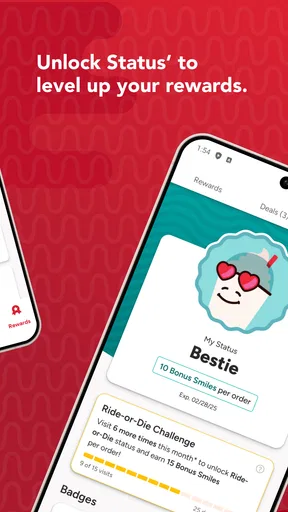
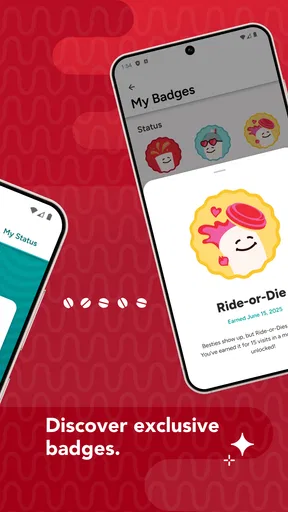
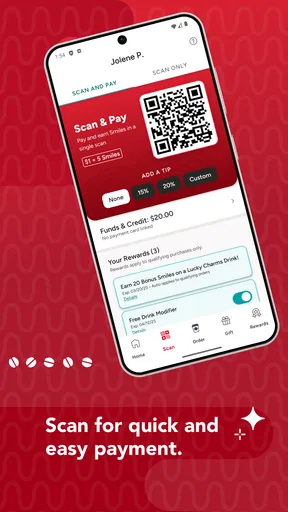
The same applies to payment and rewards. The app’s central promise is to let you pay or scan and earn status and exclusive rewards, but those steps are most comfortable when I can see what the screen is asking me to do. I treat the phone as a convenient way to manage the transaction, not as a reason to assume every part of a visit will work without a network connection. If I am in a hurry, I would check that the relevant screen is ready before reaching the counter.
Best suited to repeat visits
For someone who stops at Scooter’s regularly, having ordering and account activity together can make a familiar routine less fiddly. A saved favorite, when available in the experience, can be especially useful on mornings when I want the same drink and do not want to rebuild the order from scratch. I would still glance over the selections before submitting: a shortcut is helpful only when it matches what I actually want that day.
The app is less compelling if Scooter’s is not a convenient option near home, work, or the routes you take. It is also not a general coffee guide for comparing independent cafés or browsing every nearby chain. If I am choosing a new café for the atmosphere, seeking a broad range of local options, or ordering from a place outside Scooter’s, a map or that business’s own ordering service is the better tool.
A practical morning workflow
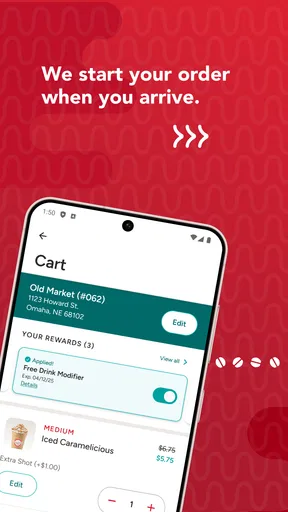
Imagine I am heading to work and know I have time for a stop but not for a long wait. I can use the app before setting off to pick a Scooter’s location that makes sense for the route, review the menu at a calmer moment, and prepare the order rather than making each decision at the counter. Once I arrive, I can follow the app’s instructions for pickup and payment. The key advantage is not magic speed; it is moving decisions out of the busiest part of the stop.
I would avoid placing an order too early just because the option is available. Traffic, a changed meeting time, or a detour can make a carefully timed pickup inconvenient. For me, order-ahead works best when I have a reasonably clear arrival plan. If my schedule is uncertain, ordering when I am closer is the safer trade-off, assuming I have a usable connection then.
Worth Reading Before You Choose

EA SPORTS FC Mobile 26 Is a Bigger Football Game, but It Takes Time

Flipboard Shows What News Apps Must Do Beyond the Feed

Switching to Android Auto Means Rethinking Your Driving Routine

Google Calendar Makes a Crowded Week Easier to Manage

Ludo King Makes the Most of the Minutes Between Plans

Baby Panda World Brings Quick Play to Modern Phones, but Its Game Library Feels Busy
What to do when the app slows you down
No mobile ordering experience can eliminate every point of friction. A weak signal, a slow screen, or an unexpected change in plans can interrupt the flow, so I would keep the visit flexible rather than assuming the app is the only way to complete it. If a page takes too long to load, I’d pause and try again when the connection improves instead of repeatedly tapping buttons and risking confusion about whether an action went through.
It is sensible to check the order details and any payment confirmation before closing the app or walking away. That is a useful habit for any phone-based purchase, especially when a connection is inconsistent. If the app does not show a clear result, I would ask a staff member what to do rather than immediately submitting the same order again. This avoids the possibility of duplicating an action and gives you a straightforward way to recover from uncertainty.
Keep the app useful without overusing data
If you are watching mobile data, make the choices that require browsing or account checks while connected to a trusted network, then use mobile service for the parts you need during the trip. I would not keep reopening the app just to check the same information; doing the planning once is both calmer and more efficient. This is a practical habit, not a claim that the app works offline.
Notifications can help surface offers, but they are not essential to placing an order. I’d enable only the alerts I find genuinely useful and review promotions when I am already considering a stop. That keeps the app from turning a simple coffee routine into a stream of distractions, and it helps me judge a deal by whether I wanted the drink anyway rather than by the excitement of seeing an offer.
How it compares with other ways to order
Compared with walking in and ordering at the counter, the app is most useful when I already know what I want and value handling the order before arrival. The counter remains the more natural choice if I want to ask questions, decide after seeing the menu, or make a last-minute change with a person. Compared with a general map app, this one is focused on the Scooter’s experience rather than helping me weigh all nearby coffee shops.
That focus is both its strength and its limit. Frequent customers may appreciate having the brand’s ordering and rewards functions in one place, while occasional visitors may find that a simple in-person order is easier than setting up another account and learning another app. I would choose based on habit: if Scooter’s is already part of your week, the app has a clearer role; if not, it may not change much about how you get coffee.
Who should try it—and who can skip it
I’d recommend it to regular Scooter’s customers who want to plan a familiar order, use the app’s payment or scan options, and keep track of rewards as part of their normal visits. The developer is Scooter’s Coffee, and the app sits in the food-and-drink category. It is free, rated for Everyone, and its average rating is 4.4 from around 4,000 ratings; that gives a useful sense of its audience, though your own experience will depend on how well it fits your routine.
It has more than a million installs and around 2,100 written reviews, but popularity alone is not a reason to keep an app on your phone. I’d skip it if you rarely visit Scooter’s, prefer ordering face to face, or do not want to manage a branded account for occasional purchases. The current version is 6.1.16, and it requires Android 10 or later on Android devices; those details are worth checking against your phone before deciding to install it.
If your main question is whether you can use it to plan ahead, that is the point of its order-ahead function. If you are wondering whether it can help with paying and rewards, those are also central parts of the experience. For a day when you are unsure where you will stop, though, a general map and an in-person decision may suit you better than committing to one chain before you know your route.
If the app is not behaving as expected, my first move would be to check the connection and reopen the relevant screen before trying the transaction again. For a question about a specific order or an account issue, the staff at the location can help with the visit itself, while app-specific assistance is better handled through the app’s available support options. This distinction matters: a loading problem and a drink-order question are not necessarily solved in the same place.
A focused tool, not a reason to change your habits
The Scooter’s Coffee app is most convincing when it removes small bits of friction from a stop you were already going to make. It can put ordering and rewards within reach, but the experience still depends on choosing the right location, having a workable connection when you need it, and allowing enough time for your plans to line up. I would use it as a practical companion for repeat visits rather than expect it to make every coffee run effortless.
Installing the Scooter's Coffee app was a breeze. Available on both Android and iOS, it didn’t take long for me to download and set it up. The interface is clean and intuitive, which is always a plus when you’re still waking up. After a quick sign-up process, I was ready to explore all the caffeinated goodness it had to offer.
Features That Perk You Up
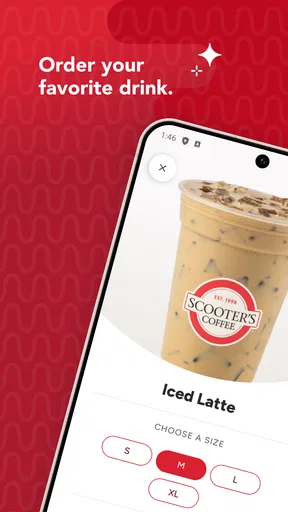
The app is packed with features that make your coffee experience delightful. One of my favorites is the order-ahead option. No more waiting in line during the morning rush! I could simply place my order through the app and pick it up at my convenience. The menu is easily navigable, and customizing my drink was straightforward.
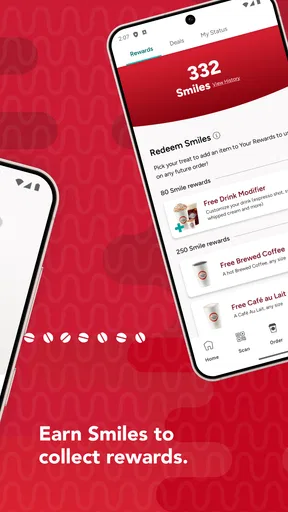
Then, there's the rewards program. Every purchase earns you points, and let's be real, who doesn’t love free coffee? I found the rewards system very motivating—it's like getting a little treat for being a coffee lover!
Usability: Smooth Like a Perfect Brew
Navigating the Scooter's Coffee app felt natural. With clear icons and a user-friendly layout, even a caffeine-deprived brain can manage to place an order without a hitch. The app also includes a handy store locator, which is great for finding the nearest Scooter’s on those spontaneous road trips.
One thing that caught my attention was the app's ability to save favorite orders. This feature is golden for someone like me who has a go-to drink. With just a tap, my usual order was ready to go.
Performance: Fast and Reliable
In terms of performance, the app didn’t disappoint. It’s snappy and responsive, without any frustrating lags or crashes. Whether I was ordering my morning latte or checking my rewards balance, the app kept up seamlessly.
The Little Extras
While the main functionalities are stellar, the app also offers some nice extras. I appreciated the notifications about new promotions and special offers. It’s always nice to be in the know when there’s a chance to snag a deal on my favorite brew.
Another bonus is the integration with mobile wallets. Paying for my coffee with a quick tap feels futuristic and, honestly, pretty cool.
Ending Thoughts: A Coffee Lover's Companion
After spending some quality time with the Scooter's Coffee app, I can confidently say it’s a must-have for any coffee enthusiast. It simplifies the coffee ordering process, offers rewarding incentives, and runs like a dream. If you haven’t already, I highly recommend giving it a download and enhancing your coffee runs.
In a world where convenience is key, this app delivers. So, whether you're a daily coffee drinker or just someone who enjoys the occasional cup, the Scooter's Coffee app is sure to make your coffee experience a bit brighter.
Pros
- User-friendly interface for easy navigation.
- Customizable drink options to suit tastes.
- Loyalty rewards for frequent customers.
- Quick order processing for time-saving.
- Location finder for nearby stores.
Cons
- Limited menu for non-coffee drinkers.
- Occasional app crashes reported.
- No delivery service available.
- Requires account for order tracking.
- Inconsistent store hours updates.
FAQs for Scooter's Coffee
What features does the Scooter's Coffee app offer?
The Scooter's Coffee app provides a range of features designed to enhance your experience, including mobile ordering, a built-in rewards program, and a store locator. You can customize your orders, save your favorites for quick re-ordering, and track your rewards points easily. Notifications about new products and promotions are also included.
How does the rewards program work in the Scooter's Coffee app?
The rewards program in the Scooter's Coffee app allows you to earn points for every purchase. These points can be redeemed for discounts or free items. Simply scan the app at checkout to accumulate points. The app will notify you when you have enough points to redeem a reward, making it easy to enjoy perks.
Is the Scooter's Coffee app available for both Android and iOS devices?
Yes, the Scooter's Coffee app is available for download on both Android and iOS platforms. You can find it in the Google Play Store for Android devices and the Apple App Store for iOS devices. Ensure your device meets the app's system requirements for optimal performance and access to all features.
Can I customize my order using the Scooter's Coffee app?
Absolutely! The Scooter's Coffee app allows you to fully customize your order. Choose from a variety of drink sizes, flavors, and add-ons to tailor your coffee just the way you like it. You can also save your customized orders for quick access during future visits, making your coffee run even smoother.
What payment methods are accepted through the Scooter's Coffee app?
The Scooter's Coffee app supports various payment methods, including major credit and debit cards. You can securely save your payment information within the app for faster checkout. Additionally, some locations may accept digital wallets, providing more flexibility and convenience when paying for your favorite coffee.


